FAB — Epic Games Marketplace
OneSignalPro
Production-ready push notification integration for Unreal Engine 4. Full Blueprint support, zero boilerplate for Android & iOS.
Production-ready push notification integration for Unreal Engine 4. Full Blueprint support, zero boilerplate for Android & iOS.
OneSignalPro is a production-grade Unreal Engine 4 plugin that brings OneSignal push notification services directly into your mobile game. It handles all the platform complexity — Android JNI bridges, iOS Objective-C wrappers, Gradle dependencies, CocoaPods, and manifest permissions — so you can focus entirely on your game logic.
The plugin exposes a clean, consistent Blueprint API. Everything works from Blueprints with no C++ required. For teams that do write C++, a full subsystem and interface layer is available.
Full implementation for Android (SDK 4.x) and iOS (SDK 3.x). Compiles cleanly on Win64, Mac, and Linux as a null stub.
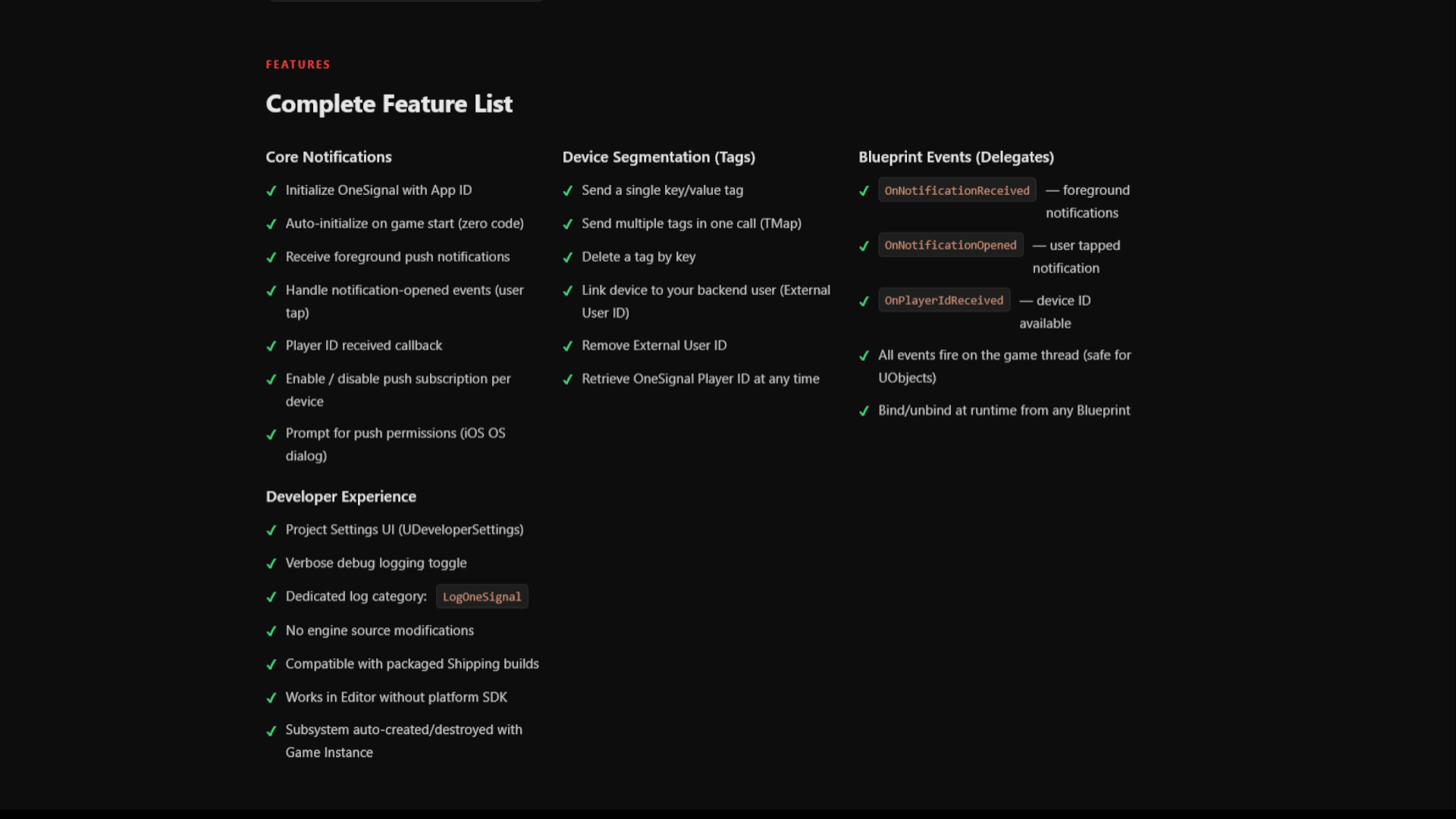
Every feature — initialize, tags, user identity, subscription, events — is exposed as Blueprint nodes with friendly display names.
Set your App ID in Project Settings → Plugins → OneSignal, enable Auto-Initialize, and the SDK starts automatically — no Blueprint nodes required.
All callbacks are dispatched to the game thread. Guards prevent calls before initialization. LoadingPhase = PreLoadingScreen for earliest init.
OnNotificationReceived — foreground notificationsOnNotificationOpened — user tapped notificationOnPlayerIdReceived — device ID availableLogOneSignal| Function Name | Category | Description | Inputs |
|---|---|---|---|
| Initialize OneSignal | OneSignal | Start the OneSignal SDK with your App ID. Not needed if Auto-Initialize is on. | AppId, bEnableDebug |
| Get OneSignal Manager | OneSignal | Returns the subsystem instance. Use this to bind events. | — |
| Is Initialized | OneSignal Pure | Returns true after a successful Initialize call. | — |
| Get Player ID | OneSignal|User Pure | Returns the OneSignal device Player ID. Empty string if not yet available. | — |
| Send Tag | OneSignal|Tags | Tag this device with a single key/value pair for segmentation. | Key, Value |
| Send Tags | OneSignal|Tags | Send multiple key/value tags in a single call. | Tags (TMap) |
| Delete Tag | OneSignal|Tags | Remove a previously sent tag by key. | Key |
| Set External User ID | OneSignal|User | Link this device to your own backend user identifier. | ExternalId |
| Remove External User ID | OneSignal|User | Clear the external user ID from this device. | — |
| Prompt For Push Permissions | OneSignal|Permissions | Show the OS push-permission dialog. Required on iOS. No-op on Android. | — |
| Set Subscription | OneSignal|Subscription | Enable or disable push notification delivery for this device. | bSubscribed |
Bind these in Blueprint via Get OneSignal Manager → Assign Event.
Fired when a push notification arrives while the app is in the foreground.
Fired when the user taps a push notification to open the app (background/killed state).
Fired once the OneSignal Player ID becomes available after initialization completes.
Copy the OneSignalPro folder into your project's Plugins/ directory. Regenerate project files and enable the plugin in Edit → Plugins → Developer Tools → OneSignalPro.
Open Edit → Project Settings → Plugins → OneSignal. Paste your OneSignal App ID and enable Auto-Initialize on Startup. Optionally enable debug logs.
In your GameMode, PlayerController, or any Blueprint — add Event BeginPlay → Get OneSignal Manager → drag off and bind On Notification Received and On Notification Opened.
On iOS you must prompt the user before notifications can be delivered. Call Prompt For Push Permissions once (e.g. on first launch or after a tutorial). On Android this is automatic.
Access the subsystem from C++ the standard UE4 way:
// Get the subsystem (valid after GameInstance starts)
UOneSignalManager* Manager = UGameInstance::GetSubsystem<UOneSignalManager>();

if (Manager && Manager->IsInitialized())
{
    // Tag the device
    Manager->SendTag(TEXT("level"), TEXT("5"));

    // Link to your backend user
    Manager->SetExternalUserId(TEXT("user-123"));

    // Bind notification event
    Manager->OnNotificationReceived.AddDynamic(this,
        &AMyGameMode::HandlePushNotification);
}
// Or use the static BP Library from C++
UOneSignalProBPLibrary::SendTag(WorldContext, TEXT("vip"), TEXT("true"));
UOneSignalProBPLibrary::SetSubscription(WorldContext, true);
[/Script/OneSignalPro.OneSignalSettings]
AppId=xxxxxxxx-xxxx-xxxx-xxxx-xxxxxxxxxxxx
bEnableDebugLogs=False
bAutoInitialize=True
Plugins/OneSignalPro/
├── OneSignalPro.uplugin
├── Resources/                         # Icon assets
└── Source/OneSignalPro/
    ├── OneSignalPro.Build.cs            # Module build rules + platform deps
    ├── OneSignalPro_APL.xml             # Android: Gradle, Manifest, Java injection
    ├── OneSignalPro_iOS_APL.xml         # iOS: plist, CocoaPod integration
    ├── Public/
    │   ├── OneSignalTypes.h             # FOneSignalNotification, FOneSignalNotificationAction
    │   ├── IOneSignalPlatform.h         # Abstract interface + native delegates
    │   ├── OneSignalSettings.h          # UDeveloperSettings (AppId, debug, auto-init)
    │   ├── OneSignalManager.h           # UGameInstanceSubsystem (main API)
    │   ├── OneSignalProBPLibrary.h      # Static Blueprint wrapper
    │   └── OneSignalPro.h               # Module class + LogOneSignal category
    └── Private/
        ├── OneSignalManager.cpp         # Platform selection + subsystem lifecycle
        ├── OneSignalPro.cpp             # IMPLEMENT_MODULE
        ├── Android/
        │   └── OneSignalAndroid.cpp     # JNI bridge (C++ ↔ Java ↔ OneSignal SDK)
        ├── IOS/
        │   └── OneSignalIOS.mm          # Objective-C++ wrapper
        └── Default/
            └── OneSignalDefault.h      # Null stub (editor + desktop)
Full setup guide, Blueprint examples, and C++ API reference included in the plugin package.
Submit issues and feature requests via the FAB product page or the creator's support channel.
Alpha XP — alpha-xp5-ai.github.io
For OneSignal dashboard setup, segmentation, and REST API: documentation.onesignal.com