Overview
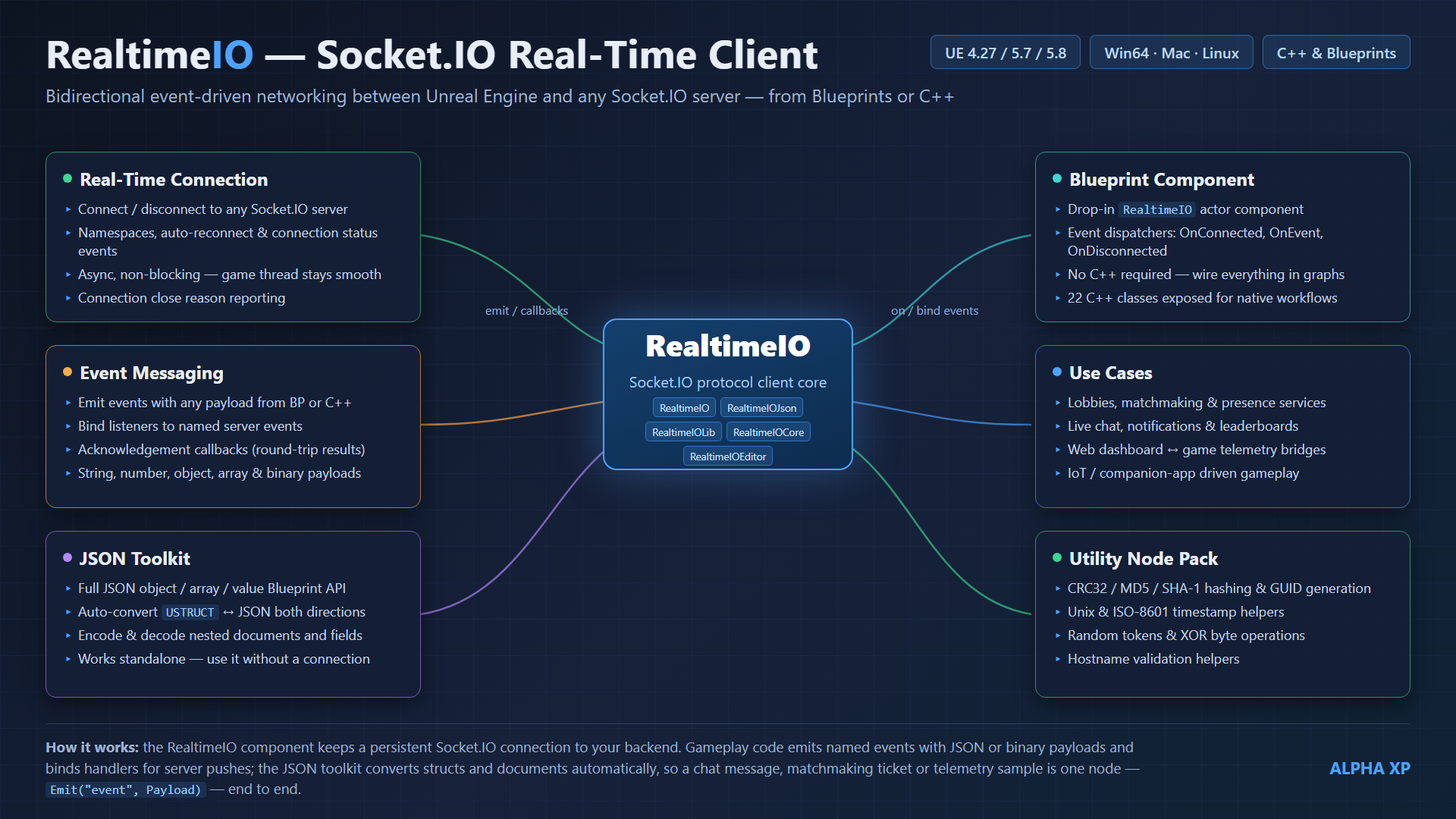
RealtimeIO connects Unreal Engine to any Socket.IO server. It emits and receives named events with JSON or binary payloads, supports namespaces and server acknowledgements, reconnects automatically, and exposes everything through an actor component that works identically from Blueprints and C++.
Typical uses: game/session chat, live dashboards and telemetry, matchmaking lobbies, IoT bridges, companion apps, and any gameplay that must react to server pushes without polling.
RealtimeIO (component + Blueprint layer), RealtimeIOJson (Blueprint JSON types), RealtimeIOLib (the underlying Socket.IO protocol implementation), RealtimeIOCore (threading & utility helpers) and RealtimeIOEditor (editor nodes such as Break Json). Full C++ source is included.Requirements
| Requirement | Details |
|---|---|
| Unreal Engine | 4.27, 5.7 and 5.8 |
| Platforms | Win64 · Mac · Linux |
| Language | Blueprints and/or C++ — no C++ required for any feature |
| Server | Any Socket.IO-compatible server (Node.js reference implementation, python-socketio, netty-socketio, …). A server is not included — see Setting up a server. |
| Bundled libraries | asio, websocketpp, rapidjson ship inside Source/ThirdParty and are compiled into the plugin. Nothing to download or install. |
Installation
From Fab
- Install the plugin to your engine through the Epic Games Launcher (Library → Fab Library → Install to Engine).
- Open your project, then open Edit → Plugins, search for RealtimeIO and make sure it is enabled. Restart the editor if prompted.
Manual (per-project) install
- Copy the
RealtimeIOfolder into your project'sPlugins/directory (create the directory if it doesn't exist). - C++ projects: right-click the
.uproject→ Generate project files, then build. Blueprint-only projects can launch the editor directly — the editor compiles the plugin on first load. - Confirm the plugin is listed and enabled under Edit → Plugins → Networking.
Setting up a server
RealtimeIO is a client. To try it you need a Socket.IO server to connect to — the plugin talks to any Socket.IO-compatible implementation you may already run in production. If you don't have one yet, the reference Node.js server takes two minutes:
- Install Node.js (LTS) from nodejs.org — the installer includes
npm. - Create an empty folder, open a terminal in it and run:
npm init -y npm install socket.io - Save the following as
server.js:const { Server } = require("socket.io"); const io = new Server(3000); io.on("connection", (socket) => { console.log("client connected:", socket.id); // echo any "chat message" event back to every client socket.on("chat message", (msg) => { console.log("received:", msg); io.emit("chat message", msg); }); // acknowledgement example (see the Acknowledgements section) socket.on("ping me", (data, ack) => { if (ack) ack({ pong: Date.now() }); }); socket.on("disconnect", () => console.log("client left:", socket.id)); }); console.log("Socket.IO server listening on http://localhost:3000"); - Run it:
node server.js
Your server is now reachable at http://localhost:3000 — the plugin's default address. For other languages and production topics (rooms, scaling, TLS termination) see the official guides at socket.io/docs.
Quick start — Blueprints
Goal: connect, receive chat message events, and send one. No C++ involved.
- Open (or create) an actor Blueprint and click Add Component → RealtimeIO.
- Select the component. In Details → RealtimeIO Connection Properties you'll find URL Params → Address And Port, preset to
http://localhost:3000. Change it to your server if needed. - Should Auto Connect is on by default, so the component connects on Begin Play. (Untick it if you prefer to call Connect yourself.)
- With the component selected, add the On Connected event from the Details panel's Events section. It fires with your
Socket IdandSession Idonce the handshake completes. - Receive events: call Bind Event To Generic Event (Event Name =
chat message) — e.g. right after On Connected — then add the component's On Generic Event event. Every bound event arrives there with itsEvent Nameand anEvent Data(RealtimeIO Json Value) pin. Drag off Event Data and use To String (JsonValue) to print it. - Send events: call Emit (Event Name =
chat message). The Message pin accepts a plain String, Integer, Float or Bool directly — Blueprint auto-casts them via the To JsonValue conversion nodes. For structured payloads see Working with JSON.
Quick start — C++
Add the modules to your <Game>.Build.cs:
PrivateDependencyModuleNames.AddRange(new string[] {
    "RealtimeIO", "RealtimeIOJson", "Json"
});
Minimal actor that connects, listens and emits:
#include "RealtimeIOComponent.h"

AMyActor::AMyActor()
{
    Socket = CreateDefaultSubobject<URealtimeIOComponent>(TEXT("RealtimeIO"));
}

void AMyActor::BeginPlay()
{
    Super::BeginPlay();

    // bind before (or after) connecting - both work
    Socket->OnNativeEvent(TEXT("chat message"),
        [](const FString& Event, const TSharedPtr<FJsonValue>& Payload)
        {
            UE_LOG(LogTemp, Log, TEXT("%s: %s"), *Event, *Payload->AsString());
        });

    Socket->Connect(TEXT("http://localhost:3000"));
}

void AMyActor::SendHello()
{
    Socket->EmitNative(TEXT("chat message"), FString(TEXT("Hello from Unreal!")));
}
EmitNative is overloaded for FString, numbers, bool, TArray<uint8> (binary), TSharedPtr<FJsonObject>, TSharedPtr<FJsonValue>, arrays of values, and even raw UStruct* pointers (auto-converted to JSON). Every overload takes an optional callback receiving the server's acknowledgement:
Socket->EmitNative(TEXT("ping me"), FString(),
    [](const TArray<TSharedPtr<FJsonValue>>& Response)
    {
        // Response holds the arguments the server passed to ack(...)
});OnNativeEvent takes an optional thread-override parameter if you want networking-thread delivery instead.Component reference
Everything below lives on URealtimeIOComponent (Blueprint category “RealtimeIO”).
Functions
| Node | Type | Description |
|---|---|---|
| Connect | Callable | Connect to Address And Port (e.g. http://localhost:3000) with optional path (default socket.io), auth token, query and headers. |
| Connect With Params | Callable | Connect using a RealtimeIO Connect Params struct (address, path, auth token, extra auth pairs, query map, header map). |
| Disconnect | Callable | Close the connection (async). |
| Emit | Callable | Send an event with an optional RealtimeIO Json Value payload to a namespace (default /). |
| Emit With Call Back | Callable | Emit and route the server's acknowledgement to a named function on a target object. |
| Emit With Graph Call Back | Callable | Latent version — the node's Result pin fires when the acknowledgement arrives; the result value is the server's reply. |
| Bind Event To Generic Event | Callable | Subscribe an event name; occurrences arrive on the component's On Generic Event. |
| Bind Event To Function | Callable | Subscribe an event name and call the named function (one RealtimeIO Json Value parameter) on the target object when it fires. |
| Bind Event To Delegate | Callable | Subscribe an event name to a custom Blueprint delegate. |
| Unbind Event | Callable | Stop listening to an event name. |
| Join Namespace / Leave Namespace | Callable | Explicitly join or leave a socket.io namespace (joining is automatic when you bind/emit to one). |
Events
| Event | Payload pins | Fires |
|---|---|---|
| On Connected | Socket Id, Session Id, Is Reconnection | Handshake complete; connection is usable. |
| On Disconnected | Close Reason | Connection closed (by either side). |
| On Connection Problems | Attempts, Next Attempt In Ms, Time Since Connected | Connection lost/unreachable; automatic retries are running. |
| On Generic Event | Event Name, Event Data (Json Value) | Any event bound via Bind Event To Generic Event arrives. |
| On Socket Namespace Connected / Disconnected | Namespace | Joined / left a namespace. |
| On Fail | — | Connection attempt failed. |
| On Error | Error Text | The server sent a socket.io error packet. |
Key properties
| Property | Type | Description |
|---|---|---|
| URL Params | Config | Default connection settings used on auto-connect: Address And Port, Path (socket.io), Auth Token, Extra Auth, Query map, Headers map. |
| Should Auto Connect | Config | Connect on Begin Play (default: on). |
| Reconnection Delay In Ms / Max Reconnection Attempts / Reconnection Timeout | Config | Retry pacing. Defaults retry forever — cap attempts or timeout for fail-fast behaviour. |
| Force TLS | Config | Use TLS even for plain http:// URLs. |
| Should Verify TLS Certificate | Config | Leave off: certificate verification is not implemented in the bundled TLS layer; enabling it will fail the handshake. Terminate TLS at a proxy if you need verified certs. |
| Plugin Scoped Connection / Plugin Scoped Id | Config | Keep one shared connection alive across levels; components sharing an Id share the socket and its bindings. |
| Unbind Events On Disconnect | Config | Auto-clean bindings when the connection closes. |
| Verbose Connection Log | Config | Extra log output for connection diagnostics. |
| Is Connected / Socket Id / Session Id / Is Having Connection Problems | Read-only | Live connection state. |
Working with JSON
Payloads travel as RealtimeIO Json Value / RealtimeIO Json Object objects (module RealtimeIOJson).
Building a payload
- Simple values: plug a String / Integer / Float / Bool straight into Emit — the To JsonValue autocast nodes convert them implicitly. Byte arrays convert the same way for binary.
- Objects: create a RealtimeIO Json Object (Construct node), fill it with its Set String/Number/Bool/Array/Object Field nodes, then plug it into Emit (autocasts via To JsonValue (JsonObject)).
- Whole structs: To JsonValue (Struct) / Struct To Json Object serialize any Blueprint struct in one node — ideal for sending gameplay state. Json Object To Struct does the reverse on receive.
Reading a payload
- Drag off Event Data and use To String / To Integer / To Float / To Bool / To Bytes (JsonValue) for simple values.
- For objects: To Object (JsonValue), then Get … Field nodes — or the editor's Break Json node, which exposes chosen fields as typed output pins.
- Files: Save Struct To Json File / Load Json File To Struct persist structs to disk as JSON.
Base64 helpers (Base64 Encode / Decode, string and bytes variants) and Percent Encode are included for interop with web APIs.
Acknowledgements (request/response)
Socket.IO lets the server answer a specific emit. Three ways to consume the reply:
| Node | Style | Use when |
|---|---|---|
| Emit With Graph Call Back | Latent pin | Blueprint request/response in a single node — execution resumes on the Result pin with the server's reply. |
| Emit With Call Back | Named function | You want the reply delivered to a specific function (one RealtimeIO Json Value parameter). |
| EmitNative(..., Callback) | C++ lambda | Native code — the lambda receives all ack arguments as TArray<TSharedPtr<FJsonValue>>. |
Server side, an acknowledgement is just the callback parameter: socket.on("ping me", (data, ack) => ack({ pong: Date.now() })) — see the server example.
Namespaces
Namespaces multiplex one physical connection into separate channels (/, /chat, /admin, …). Every Emit and Bind node has a Namespace pin (default /). Binding or emitting to a namespace joins it automatically; Join Namespace / Leave Namespace give you explicit control, and On Socket Namespace Connected / Disconnected report membership changes. Normalize Namespace (utility) ensures a name is /-prefixed.
Binary data
Socket.IO supports raw binary alongside JSON. In Blueprints, plug a Byte array into Emit (autocast To JsonValue (Bytes)) and read incoming binary with To Bytes (JsonValue). In C++ use the TArray<uint8> overload of EmitNative; incoming binary values arrive as FJsonValueBinary. Useful for screenshots, audio chunks, or compact custom protocols.
Utility node pack
General-purpose networking utilities added to URealtimeIOFunctionLibrary — available from Blueprints and C++.
| Node | Type | Description |
|---|---|---|
| Construct RealtimeIO Component | Callable | Create a RealtimeIO component at runtime on any actor. |
| Is Secure RealtimeIO Url / Is Valid RealtimeIO Url | Pure | URL scheme / shape checks before connecting. |
| Normalize Namespace | Pure | Ensure a namespace begins with /. |
| CRC32 Of Bytes | Pure | CRC32 checksum of a byte array. |
| MD5 Of String / SHA1 Of String | Pure | Hex digests of a UTF-8 string. |
| Make Guid String | Pure | New random GUID (hyphenated). |
| Now Unix Seconds | Pure | Current UTC time as Unix seconds. |
| Unix Seconds To ISO8601 | Pure | Unix seconds → ISO-8601 UTC string. |
| Format Byte Size | Pure | Human-readable size, e.g. 1536 → 1.5 KB. |
| Random Token | Pure | Random alphanumeric token (ids, nonces). |
| XOR Bytes With Key | Pure | XOR bytes with a repeating key (obfuscation, not encryption). |
| Is Valid Hostname | Pure | RFC-952/1123-style hostname validation. |
Troubleshooting
| Symptom | Fix |
|---|---|
| Never connects / On Connection Problems loops | Confirm the server is running and reachable (http://host:port, not ws://), the port matches, and a firewall isn't blocking it. Enable Verbose Connection Log and check the Output Log. |
| Connects but events never arrive | Event names are case-sensitive and must match the server exactly. Check the Namespace pin — an event bound on / won't receive emissions on /chat. Verify the binding ran (it can be done before or after connecting). |
TLS (https://) connection fails | Set Should Verify TLS Certificate to false (verification is not implemented — it always fails when enabled). For verified certificates, terminate TLS at a reverse proxy (nginx/caddy) in front of your server. |
| Custom path server (e.g. behind a proxy) | Set the Path field in URL Params — default is socket.io, matching the reference server's default mount point. |
| Auth-protected server rejects the handshake | Fill Auth Token (sent as auth: { token }) and/or Extra Auth / Query / Headers maps in URL Params to match what your middleware expects. |
| Old Socket.IO 2.x server won't accept the client | Enable allowEIO3: true on a v4 Node server, or upgrade the server — see socket.io migration notes. |
| Connection drops on level change | Expected with a component-scoped connection. Enable Plugin Scoped Connection to persist the socket across travel. |
| Packaged build can't connect (editor works) | Make sure the plugin is enabled in the project (not only the editor session) and the target platform is Win64, Mac or Linux. For shipping builds double-check your server address isn't a dev-only localhost. |
Extending the plugin
Full source ships in the package — you can read, debug and modify every layer:
| Module | Location | What to change there |
|---|---|---|
| RealtimeIO | Source/RealtimeIO | The component and Blueprint surface (RealtimeIOComponent.h), the native client wrapper (RealtimeIONative.h) and the function library. Add new nodes or connection behaviours here. |
| RealtimeIOJson | Source/RealtimeIOJson | Blueprint JSON types, struct⇄JSON conversion, Base64 helpers. |
| RealtimeIOLib | Source/RealtimeIOLib | The Socket.IO protocol engine (sio_client/sio_socket) over the vendored asio + websocketpp stack. Protocol-level changes go here. |
| RealtimeIOCore | Source/RealtimeIOCore | Threading helpers (lambda runnables), file subsystem and misc utilities shared by the other modules. |
| RealtimeIOEditor | Source/RealtimeIOEditor | Editor-only K2 nodes (Break Json). |
To iterate on the plugin itself, install it into a C++ project's Plugins/ folder (see manual install) so your IDE rebuilds it with the project. C++ types are exported (REALTIMEIO_API), so game modules can subclass the component or call RealtimeIONative directly.
Credits & third-party
© Alpha XP — alphaxp.net. Developed and maintained for UE 4.27, 5.7 and 5.8.
The plugin bundles the header-only libraries asio, websocketpp and rapidjson (in Source/ThirdParty, compiled into the plugin — no separate installation required). Their license texts are included in the package. The Socket.IO server is separate software installed by you (see Setting up a server) under its own license (MIT for the Node.js reference implementation).